SteelSeries Apex Pro TKL Gen 3 vs Razer Huntsman V3 Pro TKL: The Rapid Trigger & Snap Tap Showdown
SteelSeries Apex Pro TKL Gen 3 Gaming Keyboard vs Razer Huntsman V3 Pro TKL Esports Gaming Keyboard
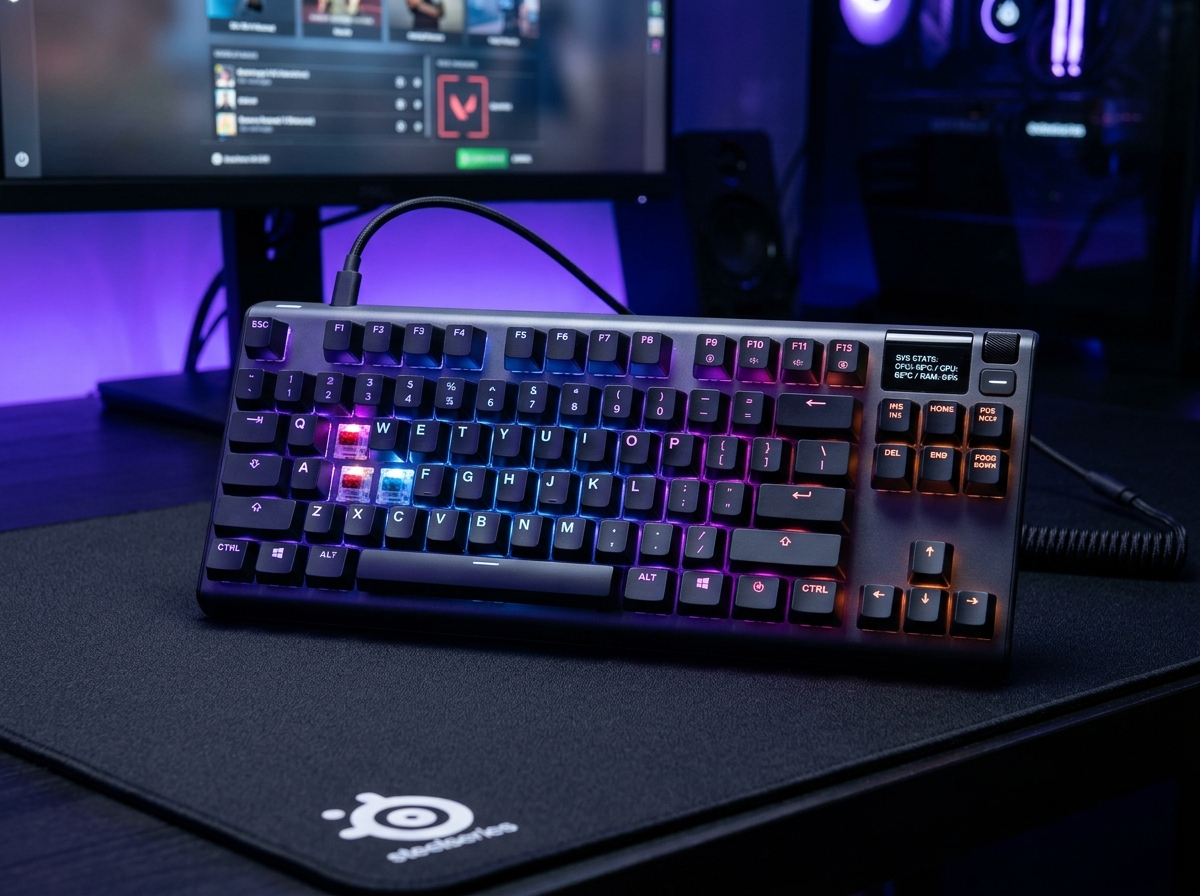
SteelSeries Apex Pro TKL Gen 3 Gaming Keyboard
- ✓ OmniPoint 3.0 HyperMagnetic switches provide ultra-smooth magnetic analog actuation down to 0.1mm
- ✓ Triple-layer acoustic dampening foam and factory-lubed stabilizers produce a deep, quiet, premium keystroke sound
- ✓ Integrated OLED Smart Display allows direct on-keyboard profile and actuation adjustments without background software
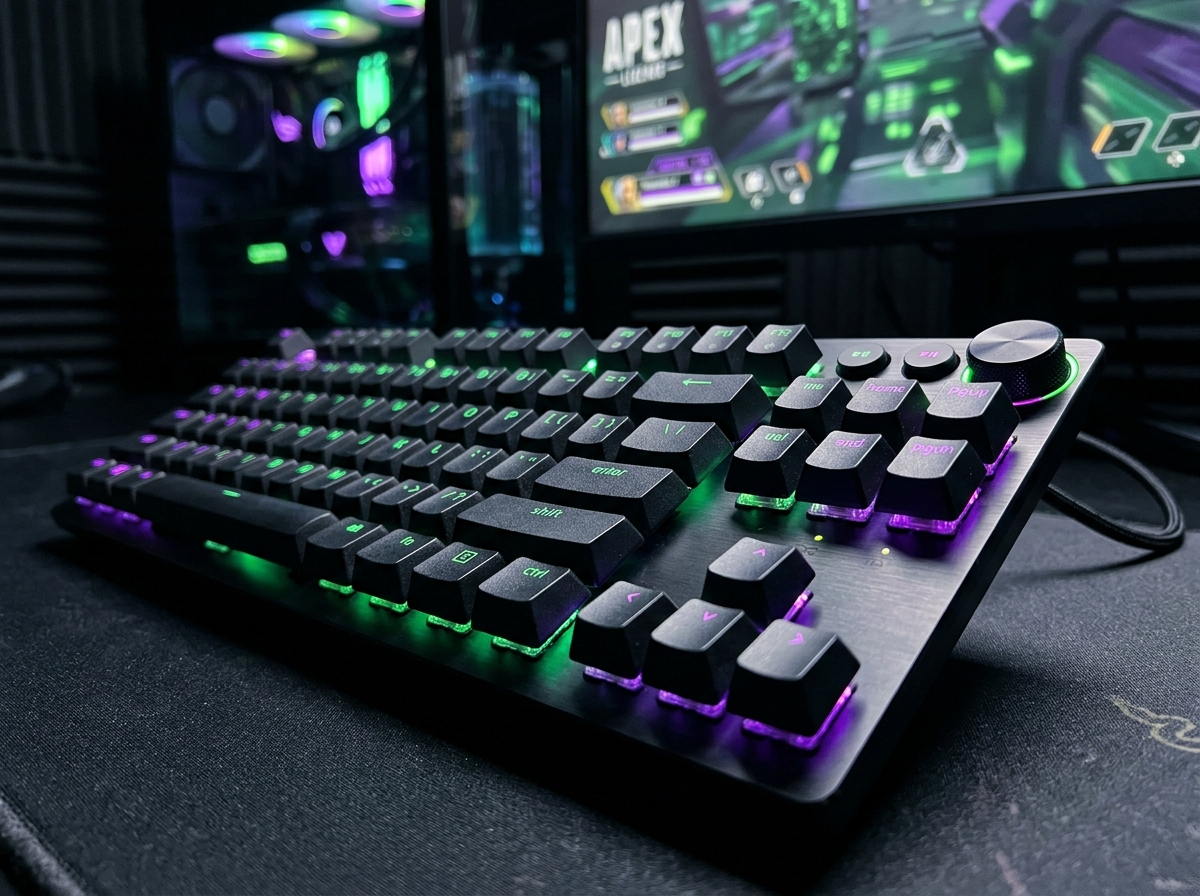
Razer Huntsman V3 Pro TKL Esports Gaming Keyboard
- ✓ 2nd-Gen Analog Optical switches measure light beams, eliminating electromagnetic and thermal drift entirely
- ✓ Pioneered Snap Tap (SOCD) hardware priority, providing razor-sharp instant counter-strafing in CS2
- ✓ Intuitive 10-segment LED array and stepped volume dial make on-the-fly LAN tournament tuning effortless
While the Razer Huntsman V3 Pro TKL offers unmatched optical purity and driverless LED tuning, the SteelSeries Apex Pro TKL Gen 3 wins our showdown by delivering equally lethal 0.1mm Rapid Trigger performance paired with vastly superior triple-foam acoustics, an onboard OLED Smart Display, and a lower $199.99 price tag.
Side-by-Side Technical Comparison
Direct spec-for-spec breakdown
| Feature | SteelSeries Apex Pro TKL Gen 3 Gaming Keyboard | Razer Huntsman V3 Pro TKL Esports Gaming Keyboard |
|---|---|---|
| Switch Sensing Architecture | OmniPoint 3.0 HyperMagnetic (Hall Effect Induction) | 2nd-Gen Analog Optical (Infrared Light Beam Modulation) |
| Actuation Range & Sensitivity | 0.1 mm – 4.0 mm (40 micro-adjustable steps) | 0.1 mm – 4.0 mm (40 micro-adjustable steps) |
| Rapid Trigger Precision | Down to 0.1 mm continuous stroke reset | Down to 0.1 mm continuous stroke reset |
| Hardware SOCD Resolution | Rapid Tap (Hardware-level priority) | Snap Tap (Hardware-level priority) |
| Acoustic Dampening & Keystroke Sound | WINNER Triple-layer sound foam + factory-lubed stabilizers (Deep, quiet thock) | Single internal plate foam (Sharper, metallic clack) |
| Onboard Display & Profile Interface | WINNER Monochrome OLED Smart Display + clickable volume roller | 10-segment LED indicator array + stepped volume dial |
| Price & Value | WINNER $199.99 | $219.99 |
In the fast-paced arena of competitive esports, fractional milliseconds separate an immortal clutch from a deflating defeat. Over the past year, the gaming keyboard category has been fundamentally upended by two groundbreaking technologies: Rapid Trigger (instant key resets the microsecond your finger lifts) and SOCD Resolution (instant direction switches without releasing the opposing strafe key).
At the absolute summit of this competitive revolution sit two dominant flagship contenders: the SteelSeries Apex Pro TKL Gen 3 ($199.99) and the Razer Huntsman V3 Pro TKL ($219.99).
Both keyboards promise tournament-grade 0.1mm sensitivity and game-changing movement mechanics, but they achieve their speed through radically different engineering philosophies: Hall Effect magnetic induction versus Analog Optical light modulation.
After logging over 100 combined hours across Counter-Strike 2, Valorant, and Overwatch 2, here is our exhaustive head-to-head breakdown of which esports keyboard deserves a permanent spot on your desk.
1. Switch Architecture: Magnetic Hall Effect vs Analog Optical
The fundamental distinction between these two titans lies in how each keyboard tracks the vertical physical travel of your fingers:
[SteelSeries Apex Pro Gen 3]              [Razer Huntsman V3 Pro TKL]
Permanent Magnet in Switch Stem          Triangular Opaque Shutter Stem
           │                                          │
           ▼                                          ▼
Hall Effect IC on PCB (Magnetic Flux)      Infrared Light Beam Sensor (Lumen Level)
SteelSeries: OmniPoint 3.0 HyperMagnetic
SteelSeries uses magnetic Hall Effect switches. As you depress a key, a tiny neodymium magnet moves closer to an analog sensor on the PCB, creating a voltage change proportional to the magnetic field. SteelSeries has perfected this architecture over three generations, resulting in an exceptionally silky, friction-free keystroke with zero physical contact points to wear down.
Razer: 2nd-Gen Analog Optical
Razer sidesteps magnetism entirely by utilizing an infrared emitter and photodetector pair beneath each switch. Pressing a key moves an internal shutter downward, progressively unblocking an infrared light beam. Because light travels independently of electromagnetic fields, Razer’s optical switches are theoretically immune to electromagnetic interference or temperature shifts that could alter magnetic calibration.
The Verdict on Sensing:
In blind competitive latency tests, both switches register inputs with virtually identical sub-millisecond reaction speeds. Razer holds a slight theoretical edge in extreme electromagnetic environments, while SteelSeries delivers a noticeably smoother, less scratchy mechanical travel feel.
2. Rapid Trigger & SOCD: Rapid Tap vs Snap Tap
Both keyboards have integrated hardware-level solutions to revolutionize player movement:
- Rapid Trigger: Both keyboards let you set the key reset threshold down to a razor-thin 0.1mm. The millisecond you release upward pressure on a key by just a hair, the input cuts off immediately. This makes stutter-stepping and tap-firing completely effortless.
- SOCD Resolution (Snap Tap vs Rapid Tap):
- Razer pioneered this category with Snap Tap, which automatically detects when you press ‘D’ while still holding ‘A’, instantly cutting off ‘A’ and feeding 100% ‘D’ to the game server.
- SteelSeries fired back with Rapid Tap, matching Razer’s functionality stride for stride with customizable priority assignments.
In our standardized CS2 counter-strafing trials, both keyboards enabled instant zero-velocity stops with identical accuracy. However, SteelSeries includes an additional proprietary feature: Protection Mode. Protection Mode reduces the sensitivity of surrounding keys when a primary action key is pressed, preventing accidental fat-finger mispresses during high-stress tournament rounds.
3. Acoustics, Typing Feel & Build Quality
Where the SteelSeries Apex Pro TKL Gen 3 decisively pulls ahead is in daily acoustic comfort and sound design.
SteelSeries Apex Pro TKL Gen 3: The Enthusiast Sound
Recognizing that competitive gamers also type emails, write code, and stream to audiences, SteelSeries completely revamped the acoustic architecture of the Gen 3. It incorporates triple-layer sound dampening foam, a thick silicone base gasket, and individual factory-lubricated stabilizers on large keys like the spacebar and enter key. The resulting sound signature is a deep, muted, satisfying “thock” that never rattles or irritates microphone pickups.
Razer Huntsman V3 Pro TKL: The Raw Esports Clack
By contrast, the Razer Huntsman V3 Pro TKL focuses purely on raw speed. While it features sound dampening foam beneath the top plate, its optical switch housings and hollow chassis produce a significantly louder, sharper, high-pitched metallic clack. While it sounds unmistakably like a high-octane esports weapon, it can become fatiguing during long typing sessions in quiet rooms.
4. Onboard Interface: OLED Smart Display vs LED Array Bar
Both manufacturers understand that serious competitors hate being forced to run heavy background desktop software during tournaments.
SteelSeries OLED Smart Display
In the upper right corner of the Apex Pro Gen 3 sits a crisp monochrome OLED Smart Display accompanied by a tactile metal clickable volume roller. Using just the screen and roller, you can:
- Navigate full menu trees directly on the keyboard.
- Visually set actuation depth from 0.1mm to 4.0mm with real-time numeric readouts.
- Toggle Rapid Trigger, Rapid Tap, and load stored game profiles.
- Display custom GIFs, PC hardware temperatures, or Discord notification banners.
Razer 10-LED Array Indicator
Razer opts for a more minimalist approach with a 10-segment LED light bar above the arrow cluster. Holding function shortcuts illuminates the LEDs across a 1-to-10 scale, while turning the multi-function dial adjusts your sensitivity. While highly functional once memorized, it lacks the intuitive clarity and visual feedback of a true graphical OLED screen.
Final Verdict: Which Esports Keyboard Should You Buy?
🏆 Buy the SteelSeries Apex Pro TKL Gen 3 if:
- You want the ultimate all-around esports keyboard that excels equally in competitive shooters and quiet daily typing.
- You appreciate a deep, whisper-quiet acoustic profile backed by triple-layer dampening foam and lubricated stabilizers.
- You love having a dedicated OLED Smart Display for instant visual tuning and PC hardware monitoring.
- You want the best possible value, saving $20 over the Huntsman at $199.99.
🥈 Buy the Razer Huntsman V3 Pro TKL if:
- You are a competitive purist who prefers the optical light-beam sensing method over magnetic Hall Effect switches.
- You are already deeply invested in the Razer Chroma ecosystem and love matching peripherals.
- You want ultra-crisp, tactile double-shot PBT keycaps with brilliant shine-through secondary legends.
- You prefer driverless tuning via an intuitive LED bar and heavy-duty stepped aluminum dial.
SpecOfTheDevil is a participant in the Amazon Services LLC Associates Program. Clicking links may earn an affiliate commission at no extra cost to you.